Monday, March 21, 2011

Netflix Streaming FTW!!!!!!!!!

If you read my last post than you surely know of my undying loyalty to all things Netflix, it was pretty obvious if you couldn't see it. And for those of you asking, "How do I get all that streaming goodness onto my 60-inch LED flat screen, and is it difficult to set up?", I can tell you from firsthand experience that its stupidly easy to set up.
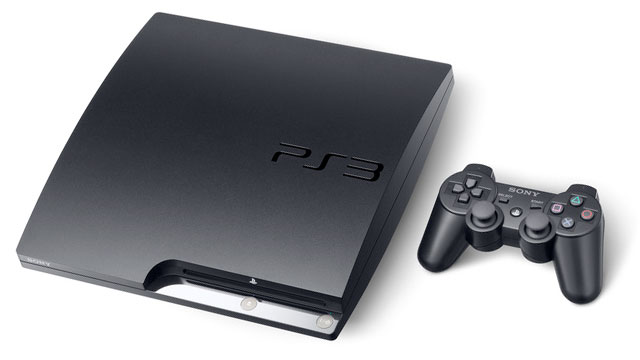
There are many devices that are capable of streaming Netflix over the internet, in fact many new televisions have that ability built into their features and don't require an external device at all. But, since there are so many different TV brands, coupled with the fact that I've had no real firsthand experience setting it up that way, I'll just have to stick with what i know. Computers were the original platform used for Netflix and are the easiest way of starting your Netflix experience. Once sign up for an account you're ready to go. Just click away to your hearts content. This is all fine and dandy but who really wants to watch movies slumped over a laptop or a keyboard? What solution has Netflix devised to save us from bad eyesight and aching backs?


That's right, there's live streaming on the current generation of gaming consoles. Those machines that kids and college students spend a majority of their time on are now useful to everyone, including the dog. The Playstation 3 and Xbox 360 are now able to bring High-Def movies straight to your beastly TV. I know, I love it! The experiences on each are a little different however. To enable Netflix on the 360 you have to be a gold subscriber on Xbox Live, which means an additional $7-13 a month on top of your internet and Netflix subscription fees. An additional subscription fee isn't needed on the Playstation 3, but from my own experience the interface seems a bit wonky. I'd go for the Xbox 360 if money isn't an issue, but in all honesty it doesn't take away from the experience once you hit play. You can also use Netflix on your Wii if you want an inferior experience. Nintendo's Wii is only capable of streaming movies in Standard Definition and requires a CD for use. In short, it sucks and should only be used in extreme cases. You've been warned!
And there you have it. You now know that there are many different ways to watch movies on Netflix. Now go my loyal readers and do as I do, watch every terrible looking movie possible and feel good about doing so. A hint though, Frozen is truly terrible and should never be watched, EVER! Unless you feel like breaking your Xbox when it's done.

Thursday, March 10, 2011

Trophy Hunter

Before I head out to the lake to start the morning fish, I grab my fish finder off of its charger and ready my pack for the day. Fish Finders are important parts of fishing in many different types of water. They do this by transmitting a sound wave through the water, allowing it to pick up any objects. The sound wave travels back to the boat, allowing the viewer to see the exact depth of anything beneath the boat.

The fish targets are displayed as either an unprocessed sonar return called an “arch”, or as a fish symbol. Many different fish finders allow you to choose either presentation. There are many factors that will effect the readings. Muggy water, strong winds, waves or even currents can create bubbles in the water, possible changing the wavelength pattern.

When I was researching my potential fish finder, I came upon a few models that stood out above the rest. One such model was the Hummingbird 407680-1 fish finder. Costing around $330, this sonar has a built in GPS. The GPS system allows you to plot out destinations and hotspots for the day. It also has the numbers for artificial reefs and wrecks in the area that you are fishing. I used the Hummingbird with one of my friends on his boat out in Tampa Bay, and the screen resolution and GPS made the hunt very successful.

The Furuno FCV 295 has a sonar detector capable of detecting some of the deepest fish, but has a price of more than $2,330. The Furuno has a 10.4 inch LCD screen, making it easy to see the fish and structure on the bottom floor. This model is better for deep sea fishing because it gives a more detailed view of the bottom and it can locate fish and respond back with an echo that gives you the exact size of the fish or size of the school of fish. Many guides and professional fisherman have this model. This model was a lot more expensive than the Hummingbird model and it did not have the built in GPS.

The Eagle FishEasy 350 Fish Finder is another affordable fish finder. This device can locate fish up to 60 feet deep. While it may not detect objects in most parts of the ocean, it is great for lakes, rivers and coastal waters. It has a protective screen giving it a great glow in direct sunlight, something other models struggle with. This Fish Easy fish finder comes in a compact size allowing it to be easily mounted anywhere on your boat.

Of the three, I chose to purchase the Hummingbird. Although I had experience with this model, it was plain to see that it was the most affordable fish finder for the dollar. Since the purchase of my new toy, I have been very successful on the lakes and coastal waters of Tampa. I recommend this model to anyone looking for a fish finder, giving you great picture and a GPS function that will find you any fishing hot spot. Sea ya on the water!

The Pros vs. Cons of the Apple TV

The Apple TV sold in stores today is not the same as the original Apple TV idea. The original Apple TV has been discontinued and Apple has started selling the black second version. Many people have a distorted idea on what the Apple TV actually is. The Apple is NOT like a TV that you would originally think of. It's a small device about the size of your palm that allows you to do certain things not applicable on a normal television set. The device connects into your TV and you can control what you watch from a remote, MacBook, or iPad. You can rent HD movies, watch Netflix instantly, rent TV shows, and stream photos and music from your computer to your TV.


We'll start with the pros of the Apple TV. One of the pros is its small and sleek design. Tech savvy people are everywhere these days and demanding the "coolest" devices with unique and easy to use designs. The size is small and extremely fast in speed. Another plus regardig the Apple TV is consumer friendly interface. The interface is easy to use and navigate through. Along with the interface, the remote is very simple to use and navigate through the interface. The upgrades of different ports including an HDMI port allow easy connection between the Apple TV device and the newest and latest technology in televisions. The Apple TV streams the data from the Apple TV onto your television set rather quickly and without problems. In addition, it is also cheaper than the mac mini.

Now for the cons of the Apple TV. For one, it has limited capabilities. It cannot play CD's, DVD's, or record programming such as a DVR would do. The different connection cables (for example, the HDMI cord) have to be purchased separately. This cord is basically needed in the attempt to connect the Apple TV with your own television console. In addition, the Apple TV is not compatible with older televisions which may cause a problem for some people. The processor cannot be updated so if there were to be a new version to come out, you would just have to buy the product all over again at a pretty high price, leading to our next point. The Apple TV may seem relatively expensive to some regarding its capabilities. Presently, the Apple TV costs $99. In addition, when streaming from Netflix, the resolution is dependent upon your Wi-Fi connection and therefore data could be lost. Also, the DVD rentals are said to come out the day it's released but that seems not to be the case. At times, it takes up to a month for a new movie to come out. One last negative about the Apple TV is consumers simply do not know about the product. Apple could do a much better job in putting this product into consumer's minds when out purchasing a TV or looking into a Netflix account.

The Apple TV would suit different people in different ways. If your extremely tech savvy and like immediacy and the latest movies and apps, then the Apple TV may still be lacking. On the other hand, if you are a consumer just looking for a "cool" and sleek toy to watch a couple movies and TV shows here-and-there, then this may be the perfect device for you!

Add Don't Follow

How many time a day do you hear a sentence that started with “Well I was on Facebook and I..”? If you are a college student you hear this at least twenty times a day. If you are like me, you have had a Facebook ever since you were in high school. Not many times do you hear “Well I saw on Twitter..”. If you were to take a poll at this moment around the Ole Miss campus about which Social Network students would prefer, I would guarantee the majority of the students would pick Facebook. In my opinion the main reason I would chose Facebook over Twitter any day is for the multiple ways you can “stalk” your friends. On Facebook you can view your friend’s interests, favorite television shows, favorite music, their religious preferences, political preferences and where they are from. When you want to get to know someone better you would more than likely look at their Facebook page rather than their Twitter page, which only shows what that certain person is thinking or doing at that moment.

Twitter to me just is a bunch of people updating their status’s, which all of my friends already do on Facebook. The only upside to Twitter is that you can “follow” your favorite celebrities and get to find out what they are thinking and/or doing at that moment. Unlike Facebook, on Twitter there is no way to instantly “chat” with your friends that are online. The only way to communicate with them via Twitter is to “tweet” at them and hope they see it in time to respond. Also the only pictures of the person whose profile you want to look at is the pictures they have as their profile picture or the ones they choose to tweet at the moment. Twitter only allows you to upload one picture at a time, you can never have photo albums like you can on Facebook.

Another main reason that Facebook is better than Twitter is that on Facebook you can send messages to multiple times at once. In my sorority that is how we communicate to our chapter and get out important messages that need to be read immediately. We all know sorority girls are more likely to check their Facebook rather than their Ole Miss webmail.

I was on Twitter the other day, and I wanted to leave my roommate who is in Washington D.C. doing an internship this semester a video telling her that i miss her. I went on Caroline’s profile and searched for about ten minutes trying to find the upload video/picture button, but to my surprise there was not one. So I had to log off and log onto Facebook just to upload a video onto her profile. You would think that Twitter would want to competed with Facebook by having more options to choose from, but they do not. For people like me who like to know a lot about their friends, Facebook is the way to go. So don’t “follow” people just because it is cool at the moment, but keep “adding” to your profile on Facebook.

Wednesday, March 9, 2011

To speak with a representative or not?

Have you ever called a technical support line to speak with a person to assist you with a certain problem? I have plenty of times. Yet, I have also ran into the problem of the customer service person not knowing how to fix my problem. My roommates and I recently switched out Internet, cable, and phone line and the gentleman installing the service ran into a bit of a problem. He called the technical support department to try and resolve the problem, but he was told that there was no way of fixing the problem. In turn, he hung up the phone and called back. This time, he managed to speak with a different representative. He, then, explained the problem again and was given a quick-fix tip that solved his, and our, problem. After he ended the conversation on the phone, he proceeded to tell my roommates and I that if we ever run into a problem with the customer support department telling us that there is no way to fix a problem, we should politely hang-up and dial the number again to speak with a different person because there is always a solution to a problem.

Another story that I have with a technical support department deals with my cell phone. About 4 years ago, before WiFi and 3G had came into existence, I had a question about checking to see how much Internet I had used so far on my phone. I called my cell phone provider to see if the representative could deliver some insight into my question. She told me the information I needed and we ended the conversation. Some months later, I wanted to recheck the status of my Internet and had forgotten how to check it. Therefore, I proceeded to call my cell phone provider again for the representative to repeat the steps to me. I ended up speaking with a representative who told me there was no way to check this and ended the conversation. I eventually figured it out, but I was furious at the fact that the representative told me that there was no way to do this, knowing there was because I had already been told the steps to do so before.

Therefore, you may be faced with the decision to call a techincal support, or customer support, center for help with a problem you have. You can either choose to call them, choose to fix the problem yourself, or find someone locally who can possibly fix the problem for you. If your only choice is to call the support center and you receive an answer that you are not completely happy with, just remember the advice given. Politely hang-up and dial the number again to receive a different representative to speak with!

To speak with a representative or not?

Monday, March 7, 2011

4 Online Job Search Sites Every College Graduate Should Use


I am soon to graduate from the University of Mississippi with a degree in Criminal Justice. Throughout these four years of college, I have learned everything from time management, exceptional organization skills, to public speaking. Now that I have a few new skills to prepare me for the rest of my life, what am I supposed to do now? This is when we start looking for careers, my fellow grads. Once we have acquired a sheet of paper worth thousands of dollars (also known as a DIPLOMA), we can now utilize the internet to surf the cyber world for full time jobs to pay off that framed sheet of paper.

I am here to show you four websites and applications that can jump-start us into any field of work we want! Sounds much easier than physically removing ourselves from our college town, flying to a city, and literally filling out applications, right?

1. First, let me introduce you to Indeed.com. As most job hunting websites, it allows you to choose a keyword or title to help narrow a search to your needs, as well as a blank to choose your city of choice. I especially liked Indeed because the initial search is so simple and not as "busy." Many sites post advertisements and ads all over the initial page, but to my favoring, this one does not.

Since I am in the particular mood for warm weather, I am choosing to search by city: Miami, Florida. The results brought up several options in which I could review. Initially, the site lists the titles of each position. If I choose to, I can narrow my search more. Some of the options Indeed allows you to choose from are salary ranges, titles, company name, location, job type, and by employer. This allows you to find the ideal job for the ideal candidate, the Ole Miss graduate!

2. Speaking of graduate, let's look at a website that is more closely related to our level of schooling. This leads us to Monster College. This site is an example to what I was referring to earlier when I was describing the "busy" initial page. There are links everywhere, images galore, and of course there is a picture of a college graduate, smiling ever so happily because he has used this website to find a job to pay for his ever so extensive student loan debt.

This site, however, does offer several more options for the job seeker. This site allows you to post a resume for employers to review. It also has a template section to help you build a resume (if you have yet to build one this far into you college career...). The tab labeled Career Advice allows you to view chat forums, article pertaining to job hunting, quizzes, as well as submit your own forum relating to your brutal experience job hunting. I highly recommend this site for anyone who is prepared to start from scratch throughout their search. My only advice, do not to what Michael Scott did in The Office, when he searched Monsters.com.

3. The third site a college graduate should consider visiting is USA Jobs. This is operated by the government, and allows you to search jobs that are directly related to the Federal Government. This site is recommended for anyone who will pass a drug screening, and wants a job that looks nice on a resume for the next time one chooses to find a new job.

This site has a Student and Recent Grads link as well. Following this link takes you to another page that allows you to also choose keywords, choose a location, as well as something new. This new slot allows you to search all student jobs, student temporary employment, student career experience, federal career intern, summer, or other student. This may help you if you are open to settling for anything other than a full time position. You may also create an account on this website that also allows your resume to be reviewable, as well as receive notifications for position openings.

4. Lastly, I have stumbled onto a website that goes well for anyone wanting to work in athletics. TeamWork Online allows you to search jobs with several different teams, venues, or leagues in which you may choose. Listed are also career fairs, new job listings, as well as sports news so you are prepared for a potential interview question perhaps.

Setting up an account with TeamWork Online is free as well. You can receive periodic e-mails listing job openings, as well as notifications when anything on your profile matches a job opening. I decided to see what this site was more about in depth. Since I am from Memphis, I chose the Memphis Grizzles tab leading me the Grizzlies website. Keep in mind that selecting a team does lead you away from TeamWork Online and to the sport's official website. From there, I am already on the Grizzlies job opening section where I can review how well my very expensive Degree does not match any of the openings with my favorite sports team.

Perhaps it as this point where I can go back to any of the other websites and search for jobs that I may be better qualified for. Even better, I can sit back on my weekends, and instead of searching for job openings, I may just buy tickets to Grizzlies game and be ready to pass a drug test for my Federal job.